

Automatic vs manual excerpts
Have you ever looked at poetry in the reader, and noticed that in some of the excerpts (previews) all the lines of poetry run on together, without even a space at the line ends — even when there is punctuation? For example:
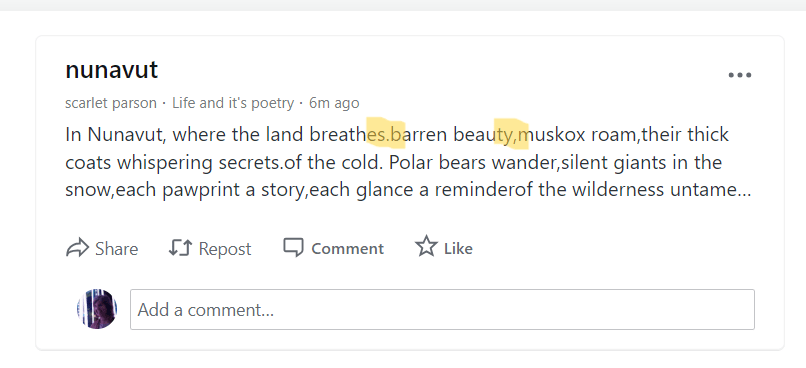
and
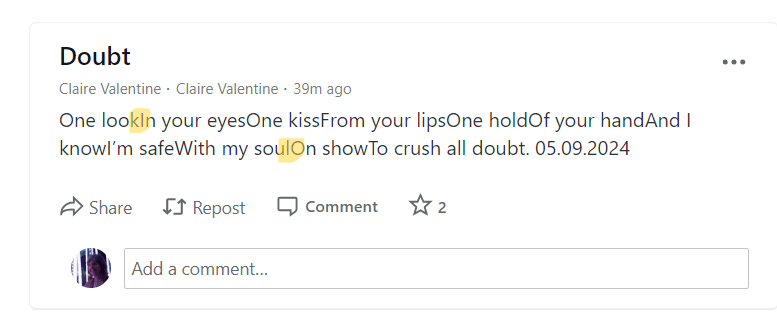
I feel like the good folk at WordPress could easily do something about this! But while we wait for that, you can:
- add a space at the end of each of the first few lines of your poem (this way, although the lines will still run on, at least the words won’t be fused together!)
- write a manual blurb, which might be a good chance to sell your poem … but be careful, because you’re asking people to make a mouse click, which can be a roadblock … and if your poem is short, like a haiku, having it right there in the preview pane will lead to more people reading it. You may even know they have, because it’s easy for someone to just click like and then keep scrolling through their reader feed
- copy and paste your favourite few lines of the poem into the manual excerpt box; if you do this, the line breaks should stay in place! But people using the reader on JetPack will only see the first two lines, because of the strange spacing that comes up there
- copy and paste the first few lines of your poem into the manual except box, delete the line breaks but place a solidus / at the end of each verse line, to indicate where the line end falls.
I favour each of these different workarounds, at different times! This morning it was number 4.
If you found this post helpful, please subscribe to Wordflower poetry blog and visit Part 3 of these hacks!
Many thanks again to Autumn at WordPress for the idea for these posts, and to the readers of Part 1 who’ve already added to my knowledge!
Cover image from Pexels Free Photos.
Discover more from Wordflower
Subscribe to get the latest posts sent to your email.
 Wordflower